Keyboard shortcuts are something we all have on our personal computers, whether it’s a Mac or a PC, but it’s not something that we get to enjoy on our iPhones or iPads.
A new jailbreak tweak dubbedProtonixis now available in Cydia that lets you set up dynamic keywords on your device so that when you type them, special things will happen.

We’ll show you more in this review.
Keywords? What does that mean?
Protonix lets you create what are known as dynamic keywords. They are not the same askeyboardshortcuts, but they serve a similar purpose in that typing certain things will trigger things to happen.
The tweak works two ways: 1) you’re able to set up keywords that are replaced with important information in real time, or 2) you can set up keywords that will triggerActivatoractions of your choice.

Protonix preferences pane
You can head over to the tweak’s preferences pane in the Settings app just after installing it to see how to configure it to your liking.
Here, you can do things like:
We’re going to leave the suffix and prefix settings alone, but basically a prefix is something that needs to be typed right before your keyword for it to work, and a suffix is just the opposite; it has to be typed right after your keyword for it to work. For the most part, just using a prefix is all you’re going to need.
With Case sensitive enabled, you will have to type your keywords exactly as you save them, with all of the same upper-case and lower-case letters that you save it as.

Next, we’ll dive into the keyword settings.
Protonix dynamic keyword replacement
One of the major new features Protonix brings to the table is dynamic text replacement. With this feature, you can type out a shortcut, and then the text will be replaced by a real-time value. To understand how this works, you’ll open theEdit Keywordscell that you saw in the preferences pane above.
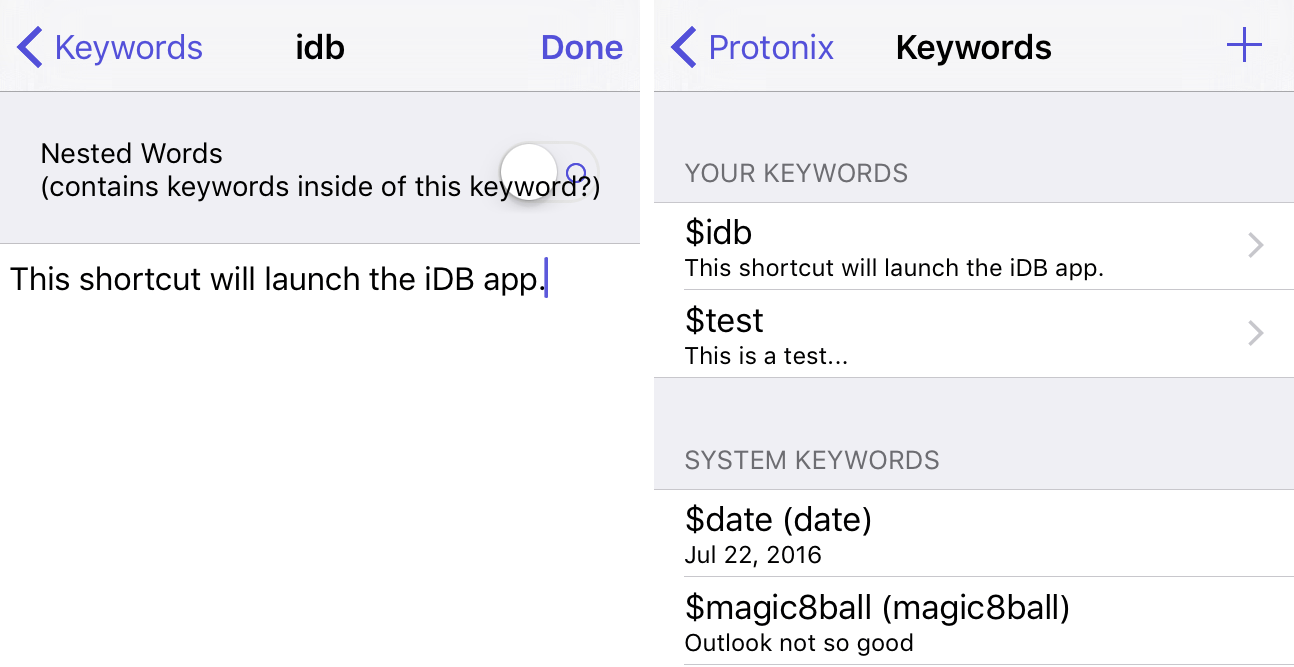
From here, you can create, manage, and add keywords. By default, all of the following already exist:
Protonix dynamic keyword Activator support
You can also create new keywords and assign them Activator actions by tapping on the+button at the top right of the preferences pane. For our example, we’ll create a new shortcut called $idb that will launch the idb app. There’s no need to type the “$” icon before the actual keyword because it’ll be added for you. When you’re happy with the name, you tap on the create button.
Now the keyword is added to your keyword list and you can tap on it to give it a description:

The next thing you want to do is open the Activator preferences pane, or launch the Activator app, and assign your new Protonix keyword shortcut to an Activator action.
In this case, we’ll be assigning our $idb keyboard shortcut to launching the iDB app. You can assign your shortcut to anything you want.
And now whenever you type your keyboard shortcut, the Activator action will occur. Pretty neat right?
More details you need to know
Protonix is very different from iOS’ stock text replacement feature, because it allows you to fetch real-time information based off of pre-programmed dynamic shortcuts like (date), (time), (udid), etc. The stock feature only lets you replace words or letters with more words or letters and doesn’t even let you assign Activator actions to your shortcuts, so it isn’t quite as useful.
you may nest as many of the dynamic text replacement keywords into one another with parentheses as you want. For example, if you wanted to show the date and the time, you could do a keyword with a name like $datetime and nest them like this: (date, time). This would show: July 25, 2025, 12:00 PM.
The provided dynamic text replacement keywords that are enabled by default are the options you have to choose from, and you can mix and match them all you’d like to. As far as we can tell, there are no other hidden dynamic text replacement keywords that aren’t included with the default setup, and there is no documentation to suggest that there are more.
Wrapping up
Protonix is a really neat new way to get things done or query your device for information by just typing keyboard shortcut strings. This will be most useful foriOSdevice power-users.
The tweak is available in Cydia’s BigBoss repository right now for $1.50 and works on alljailbrokeniOS 8 and iOS 9 devices.
What are your thoughts on the concept behind Protonix? Share in the comments!
